Network Security Protocols
Learn about secure network protocols at the different layers of the OSI model.
Introduction
A network protocol specifies how two devices, or more precisely processes, communicate with each other.
A network protocol is a pre-defined set of rules and processes to determine how data is transmitted between devices, such as end-user devices, networking devices, and servers. The fundamental objective of all protocols is to allow machines to connect and communicate seamlessly, regardless of any difference in their internal design, structure, logic, or operation. In analogy, a networking protocol is like a “common language” that helps make communication possible among people with different native languages and from various parts of the globe.
Application Layer
- Each protocol represents specific layers of the OSI or TCP/IP model and operates as per the functionality of that layer.
- TCP and UDP-based protocols operate on specific network ports.
HTTPS Protocol
Hypertext Transfer Protocol Secure (HTTPS) is a client-server protocol; responsible for securely sending data between a web server (website) and a web browser (client side). It is an encrypted variant of HTTP which sends data in an unencrypted format.
HTTP would be enough to browse a website to learn about a company product; however, HTTPS is a must if you want to provide your credit card details to place an online order. HTTPS was developed to securely share sensitive information, including passwords, contact information and financial information, between web browsers and websites. Without HTTPS, secure online banking and online payment wouldn’t have been possible.
Workflow - HTTPS
HTTPS uses its unencrypted counterpart, i.e., HTTP, and adds a layer of encryption. In this case, it is SSL/TLS (Secure Sockets Layer/Transport Layer Security); the rest of the workflow remains the same. So before proceeding forward, we will review how HTTP requests and responses operate in a typical client and server environment.
Request and Response - HTTP
An HTTP request is made by a user agent (a browser or any other application sending requests through a web API (Application Programming Interface)). It is vice versa in the case of response. This request aims to access some resources on the remote web server, which is then responded to by the web server. The figure below shows a web browser sending an HTTP request to a web server, listening at TCP port 80.
If an attacker can capture the network packets between the client and the server communicating over HTTP, they will be able to read their content as it is sent in cleartext.
Request and Response - HTTPS
Even if an attacker can capture the network packets between the client and the server communicating over HTTPS, they will fail to read the contents of the TCP data due to encryption.
Technical Overview - FTPS
File Transfer Protocol Secure (FTPS) is a communication protocol which is a refined and secure version of File Transfer Protocol (FTP). Initially, FTP was developed in 1971 and published as RFC 114. Additional improvements and various changes were published in RFC 765 and RFC 959.
FTP was designed as a client-server model; separate control/command and data connections between a client and a server are used, along with a username and password. In FTP, both authentication and data transfer take place in an unencrypted form between the client and the server; however, in FTPS, an encrypted channel is established.
Workflow
FTPS is an extension of FTP, which adds TLS security to commands and data connections. It is necessary to get an overview of FTP to understand FTPS.
Request and Response - FTP
As described earlier, FTP is based on the client-server model. It utilizes the following two communication channels between the client and the server.
- Control Connection: In this connection, an FTP client (such as Filezilla and CuteFTP) sends a connection request (authentication) to the remote FTP server at the default FTP port, TCP port 21. As the name implies, a control connection is used for sending and receiving commands and responses.
- Data Connection: After authentication, this connection is used for transferring data (files and folders).
FTP Connection Types
FTP has two modes:
- Active modes
- Passive mode
Active Mode
In active connection mode, the client establishes the control connection to send commands/authentication parameters to the server. After authentication and upon the client’s request to initiate data transfer, the server establishes the data connection to the client to transfer the data. In brief:
- The FTP client connects to the FTP server at TCP port 21 to establish a command connection.
- The FTP server connects to the FTP client at TCP port 20 to establish a data connection.
It is worth mentioning that this type of connection is unsuitable in an environment where the client is behind a firewall, as it will block incoming connections to the client. In the case of a client behind a firewall, a passive connection would be necessary.
Passive Mode
In passive connection mode, the client establishes the control and data connections. The client sends the PASV command to the server over the command channel; the server sends a random port to the client. As soon as the client receives the port number, the client establishes a connection to the provided port number so that the server can initiate the data transfer to the client.
This type of connection works well when the client is behind the firewall.
FTP Data Types
When data exchange between client and server takes place, the following type of data types are used:
- ASCII/Type A: This is the default type and is used for text file transfers. If necessary, data is converted into 8-bit ASCII before transmission and then converted back upon reception.
- Image/Type I: This is commonly referred to as the binary mode. It uses byte-by-byte transmission. The recipient stores the received bytes upon reception.
- EBCDIC/Type E: It is suitable for text communication using the EBCDIC character set.
- Local Type L n: It is typically used for file transfer among machines that do not support 8-bit bytes transfer. Here
nis a second parameter that represents byte size.
Request and Response - FTPS
As the name implies, FTPS is an extension of FTP. It adds an encryption layer to transmit command and data channels between client and server securely. The following two methods are used to invoke security:
- Implicit Connection: In this connection, FTPS client and server establish a link in which both command and data channels are secured automatically with SSL encryption.
- Explicit Connection: The FTP client explicitly requests the server to invoke an SSL/TLS secured session on port 21 and then continue data transfer based on a mutually agreed authentication mechanism. With explicit connection, you can choose which channel to encrypt by choosing among three modes of communication for control and data channel, i.e., control only encrypted, data only encrypted and both control and data encrypted.
The standard port for FTP and Explicit FTPS is 21, whereas it is 990 in the case of Implicit FTPS. Adding FTPS protects against sniffing attacks against login information and data.
SMTPS Protocol
Technical Overview
Simple Mail Transfer Protocol Secure (SMTPS) is an extension of SMTP, which is used for email communication. We should not confuse SMTP with POP3. Although both are used for email communication, SMTP is an “Email Push Protocol” used to transfer email messages from the client to the server. In contrast, POP3 is used to download email messages from the server to the client. SMTPS is an extension of SMTP; it uses TLS/SSL to provide authentication, integrity, and confidentiality for transferred data. First, let’s review the SMTP protocol.
SMTP Protocol
As described earlier, SMTP is an “Email Push Protocol” commonly used to transfer emails from an SMTP client to an SMTP server. SMTP is implemented in the following two models:
- SMTP End-to-End: This model is used for email communication between organizations. In this model, the sender-side SMTP client initiates an SMTP connection to the recipient’s SMTP server.
- SMTP Store-and-Forward: This model is used for email communication within an organization. In this model, the SMTP server will maintain the copy of the mail within itself (i.e., store) until the copy is forwarded to the receiver.
SMTP Components
To understand the workflow of SMTP, we will study the following essential components of SMTP:
- User Agent (UA): UA is responsible for creating the email message and sending it to the Mail Transfer Agent (MTA).
- Mail Transfer Agent (MTA): MTA will transfer the email from the UA to the recipient MTA across the Internet (often, the MTA and Mail Delivery Agent are hosted on the same server).
TLS Process in SMTPS
SMTPS is not a proprietary protocol; instead, it wraps SMTP inside TLS. You can say that SMTPS is similar to SMTP on the application layer, with an extension of TLS encryption at the transport layer. For encryption, the STARTTLS command is used between the email client and the email server.
Port 587 and 465 are both frequently used for SMTPS traffic. Mails transmitted using SMTP are not encrypted, so they are prone to sniffing attacks. Therefore, SMTPS is used to encrypt emails through TLS before transmission. In addition, SMTPS also forbid attackers from sending spam messages from compromised/vulnerable domains, exfiltration sensitive information, and conducting phishing attacks.
POP3S Protocol
Technical Overview - POP3S
Post Office Protocol Secure (POP3S) is an extension of the POP3 protocol; it is used for the encrypted retrieval of email messages from the email server to the email client. So first, let’s review the POP3 protocol.
POP3 Protocol
In the previous section, we explored how SMTPS is used for secure email transmission. SMTP is not responsible for retrieving email messages; here, POP3 comes into play. POP3 is the latest POP version; it retrieves email messages from a Mail Delivery Agent (MDA) to a Mail User Agent (MUA).
POP3 Components and Workflow
Like SMTP, POP3 has two components: client (MUA) and server (MDA). The steps are the following:
- The email client establishes a connection to the email server.
- The email client downloads all the queued emails from the email server. (This is a default option; however, the client can select only particular email messages to download.)
- All emails are saved on the device that initiated the connection.
- The email server deletes the email copy. (This is a default option; a client can choose not to download an email after it is retrieved.)
Limitations of POP3
- Emails are Processed Locally: No synchronization of email messages across multiple devices. Protocol downloads the emails on the currently logged-in device and usually deletes them from the server.
- Transmission in clear text: The username and password, along with the email messages, are sent in cleartext, which makes them vulnerable to sniffing attacks.
POP3S
As we conclude, POP3 is considered weak from a security point of view. This requires an added layer of security; hence, POP3S comes into play. POP3S is an extension of POP3, which wraps the communications related to email messages within TLS. For this purpose, the client and server initiate the STARTTLS command, as shown in the figure below. After the EHLO, the POP3S server will trigger the switch to TLS. Note that EHLO stands for Extended HELO, where HELO is the command used to identify to the server.
SSL/TLS Protocol
Technical Overview - SSL/TLS
Secure Socket Layer (SSL) and Transport Layer Security (TLS) are protocols used to encrypt data exchanged between a client, such as a web browser, and a server. Consider SSL/TLS as a wrapper that encrypts various communication protocols, such as HTTP and FTP, to create HTTPS and FTPS. SSL is not commonly used nowadays as TLS has been gradually replacing it.
SSL/TLS Workflow
SSL/TLS handshake is performed to encrypt the communication between client and server through the following steps:
- Client Hello Message: The client sends a hello message to the server; it includes the client TLS version and the cypher suite that the client supports, in addition to random bytes.
- Server Hello Message: The server responds with a hello message, highlighting its certificate, chosen cypher suite and random bytes.
- Authentication: The client authenticates the server’s certificate through the certificate authority that issued it. For example, when we visit Google, Google shares its certificate. The received certificate is verified by our browser, which is pre-installed with the certificates of various certificate authorities.
- Premaster Secret: The client encrypts random bytes with the server’s public key. (The client retrieves the public key from the server’s certificate.)
- Decryption of Premaster: The server decrypts the premaster with its private key.
- Session Keys Generated: The client and the server generate session keys based on client random bytes, random server bytes and premaster secret. Both will arrive at the same results; this session key is not transmitted, and encryption and decryption are based on this key.
- Ready Messages: The client and server send a “finished” message using the session key to indicate that the session is ready for transmission. The client and server are now ready to exchange messages over SSL/TLS encrypted connection.
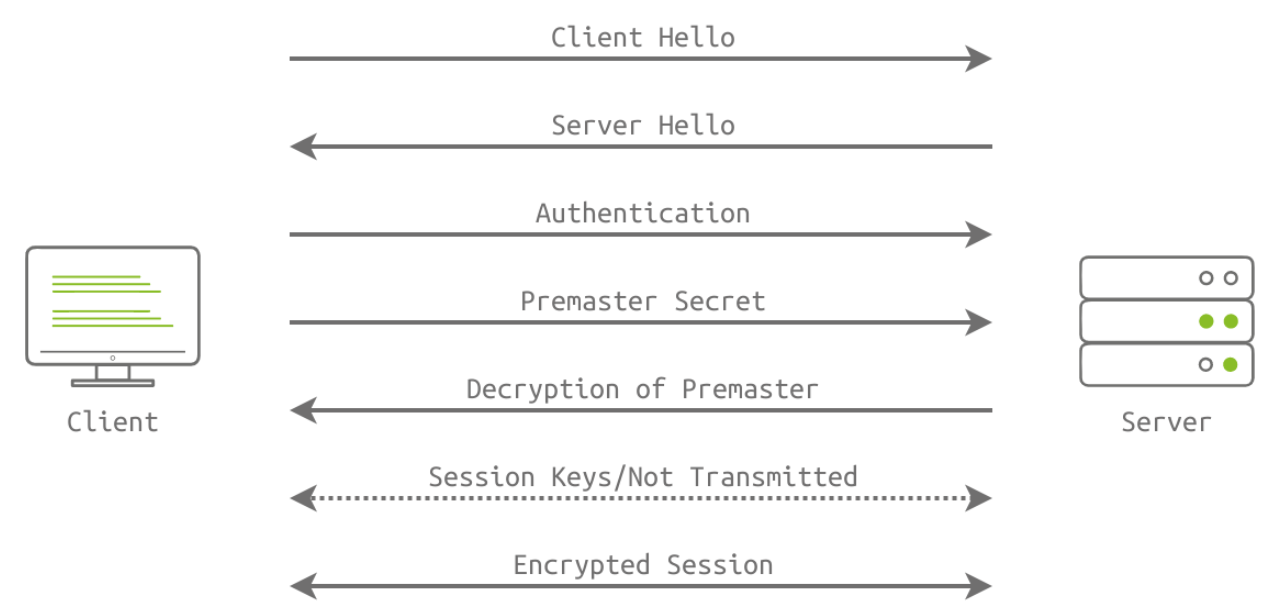
TLS is a wrapper that encrypts communication of communication protocols. It has port numbers for various protocols, such as 443 for HTTPS and 990 for FTPS.
SOCKS5 Protocol
Technical Overview - SOCKS5
Socket Secure (SOCKS) is a proxy protocol for data exchange through a delegate server (SOCKS5 proxy). It is used to secure application layer protocols. For example, the Squid server implements the SOCKS5 protocol to transfer data via the HTTP protocol.
SOCKS5 Workflow
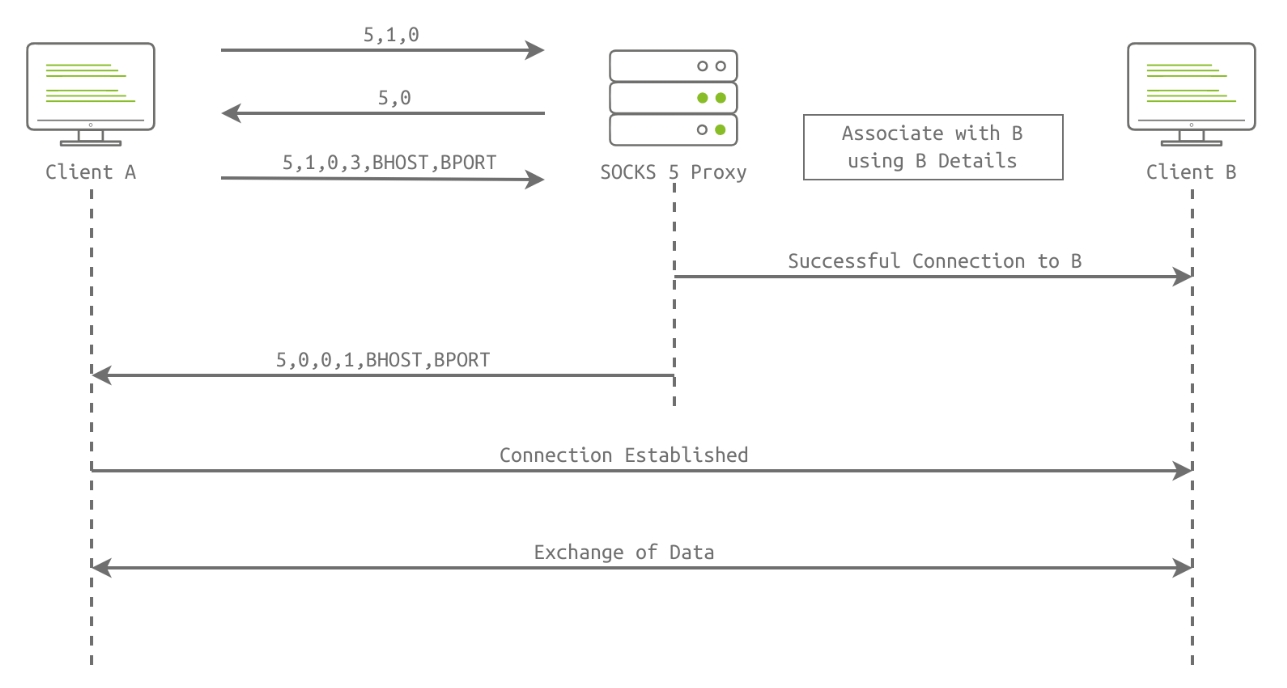
Consider a scenario when user A wants to connect with client B over the Internet, but a firewall is between them. The following handshake steps are involved:
- Client Initiation
- Client A connects with the SOCKS5 proxy and sends the first byte (0x05) to the proxy where “5” is the SOCKS version.
- Client A sends a second byte (0x01). One means authentication is supported.
- Client A sends the third byte (0x00, 0x01, 0x02, or 0x03); these bytes denote the supported authentication methods and can be of variable length.
- SOCKS5 Proxy Reply
- The proxy sends back a second byte, which is the chosen authentication method by the proxy server.
- After the initiation packet, client A sends the request packet, which includes BHOST & BPORT numbers.
- The successful session is established between client A and the proxy. The same steps are involved in the association of client B with the proxy.
- Data Transfer
- After successfully associating both clients with a proxy server, both clients can exchange data and share information that will be routed through the proxy server.
📚 References
You can find me online at:
