Network Device Hardening
Learn techniques for securing and protecting network devices from potential threats and attacks.
Introduction
Network devices are the building blocks and backbone of today’s contemporary and large-scale networks and systems. The role of network devices is to ensure reliable and efficient transfer, filtering, and management of data across or within networks. Many network devices range from basic layer one hubs or repeaters to layer two switches, layer three routers, load balancers, virtual private networks, and intrusion prevention systems.
Common Threat And Attack Vectors
| Threat | Description | Attack Vector |
|---|---|---|
| Unauthorised access | Gain unauthorised control of a network device, and then the complete network. | - Password attacks (brute force, dictionary & hybrid) - Exploit known vulnerabilities, e.g. RCE - Social Engineering/Phishing attack to trick network administrators into disclosing sensitive information such as usernames and passwords of devices |
| Denial of Service (DoS) | Disruption of critical devices and services to make them unavailable to genuine users. | - Flooding devices with fake requests - Exploiting vulnerabilities in logical or resource handling - Manipulating network packets |
| Man-in-the-Middle Attacks | Intercept the network requests between two parties by masquerading as each other to steal sensitive information or alter/manipulate the requests. | - ARP spoofing - DNS spoofing - Rogue access points |
| Privilege escalation | Gaining higher-level privileges or rights to perform restricted actions, e.g. accessing sensitive information or executing malicious code. | - Weak passwords or use of the same passwords for user and admin accounts - Exploiting vulnerabilities - Misconfigurations |
| Bandwidth theft/ hotlinking | Linking a bandwidth-intensive resource (image or video) from an external website to its original website, without permission. This can cause increased traffic to the original website. | - Scraping large volumes of data - DoS attacks - Malware attacks |
Common Hardening Techniques
- Update and Patching
- Disabling unnecessary Services and ports
- Principle of Least Privilege (POLP)
- Logs Monitoring
- Backup regularly
- Enforcing Strong Passwords:
- Multi-Factor Authentication (MFA):
Implementation of Monitoring and Logging Controls
Logging in network devices is essential for detecting and investigating security incidents, identifying performance issues, and complying with regulatory requirements. It provides a record of events and activities on the device, which can be used for troubleshooting, forensic analysis, and auditing purposes. The following techniques are generally used for logging:
- Syslog: A protocol to standardise the transfer of log messages, with the purpose of storing and analysing log messages to a central server.
- SNMP: Traps a notification sent by a network device to a management system when a predefined event occurs.
- NetFlow: A protocol used to collect and analyse network traffic data for monitoring and security analysis.
- Packet Captures: Capturing network traffic and storing it for analysis using a tool like Wireshark.
Hardening Virtual Private Networks
Virtual private networks (VPNs) are now needed in the age of remote work and online communication to protect sensitive data and preserve privacy. Yet, hardening VPNs is crucial to ensure their efficiency as cyberattacks continue to develop. Hardening VPNs entails adopting additional security measures, such as multi-factor authentication and encryption techniques, to make it more challenging for hackers to access the network. By taking these extra precautions, businesses can better safeguard their data and defend against cyberattacks, raising their security level and bringing them more peace of mind.
1
2
3
4
5
6
7
8
9
10
11
12
13
14
15
16
17
18
19
20
21
22
23


local 10.48.160.180 //change that to your local machine IP
port 1194
proto udp
dev tun
ca ca.crt
cert server.crt
key server.key
dh dh.pem
auth SHA256
tls-crypt tc.key
tls-version-min 1.2
topology subnet
server 10.8.0.0 255.255.255.0
push "redirect-gateway def1 bypass-dhcp"
ifconfig-pool-persist ipp.txt
push "dhcp-option DNS 1.1.1.1"
push "dhcp-option DNS 1.0.0.1"
push "block-outside-dns"
keepalive 10 120
cipher AES-256-CBC
Hardening Routers and Switches and firewalls
Routers and switches must be hardened for the network infrastructure to be secure and reliable. Every network needs routers and switches, often the first line of defence against potential security risks and attacks. By hardening these devices, we can lower the possibility of unauthorised access, avoid data breaches, and ensure network service availability. Improved network performance, increased resilience against cyberattacks, and regulatory compliance are a few of the main advantages of hardening routers and switches. Routers and switches without enough hardening are susceptible to various attacks, including denial of service and network profiling.
we will be using OpenWrt which is a free and open-source Linux-based operating system for embedded devices
at 10.48.160.180:8080 with the following credentials:
Username: root Password: TryHackMe
Recommended Hardening Techniques
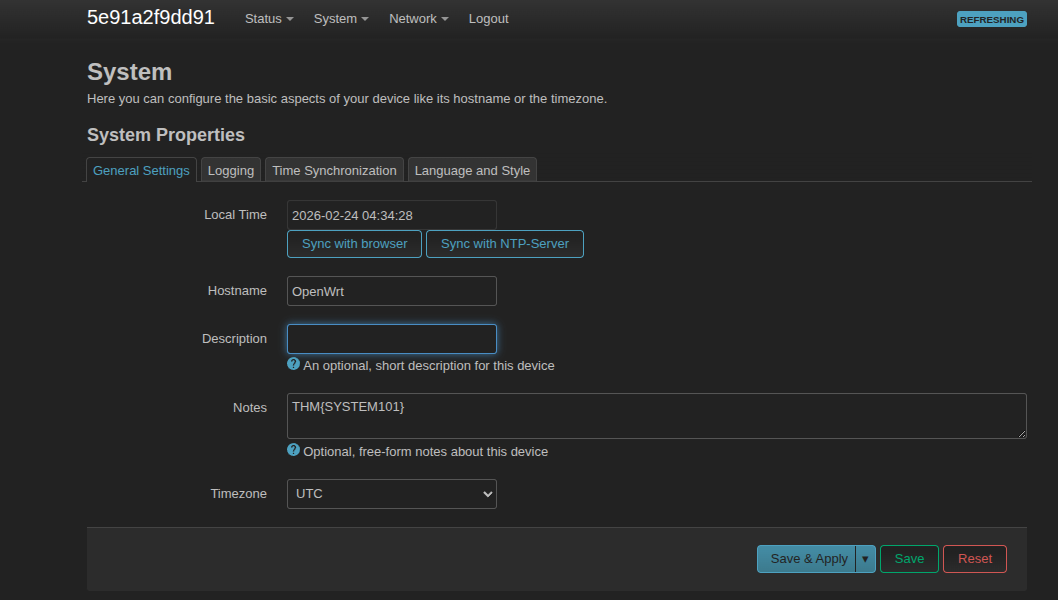
Setting up the device: While setting up any network device, it is necessary to fill in all relevant details like hostname, timezone, logging, and more. These features assist in conducting incident handling in case of a compromise. For example, logging must be enabled to log all the events with the default alert level Debug. Similarly, timezone and time synchronisation must be set accurately to properly correlate events with their occurrence time. You can enable and modify these settings through System > System and select the desired option.
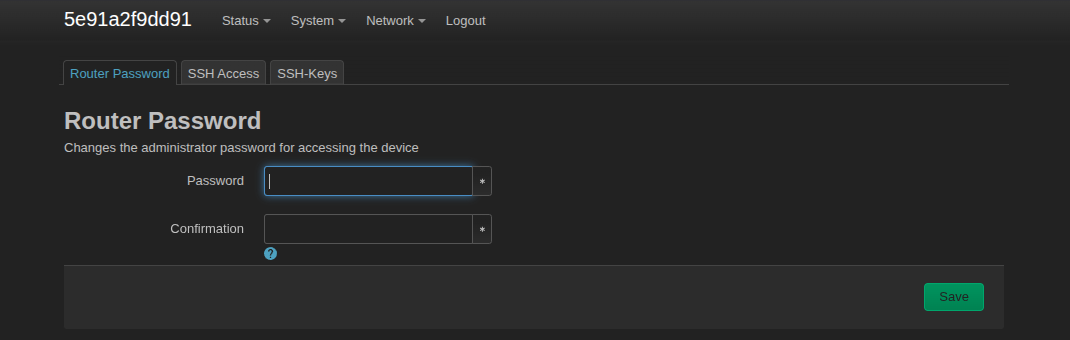
Change default credentials: Usually, the admin web interface is protected through a username and password, and people tend to ignore changing the default. A threat actor can access the router’s admin interface and compromise the whole network using default credentials. We can change the default password in OpenWrt through System > Administration, enter a new password, and click the Save button.
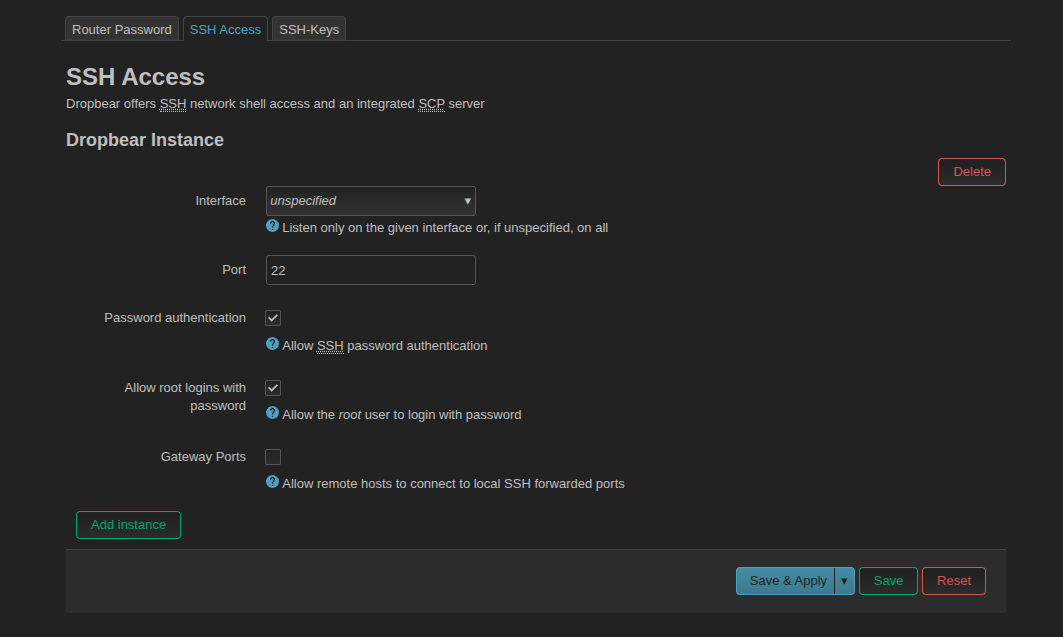
Enable secure network protocols: For a network device to maintain the confidentiality, integrity, and availability of network traffic, secure protocols must be enabled. Secure protocols like HTTPS, SSH, and SSL/TLS offer encrypted authentication mechanisms and communications to stop unauthorised access and eavesdropping. By enabling secure protocols on a router, you can reduce the risk of data breaches, man-in-the-middle attacks, and other security threats. You can enable SSH in OpenWrt through System > Administration > SSH Access, then select the interface and port number and click Save & Apply. Moreover, you can also add specific public SSH-Keys for passwordless login.
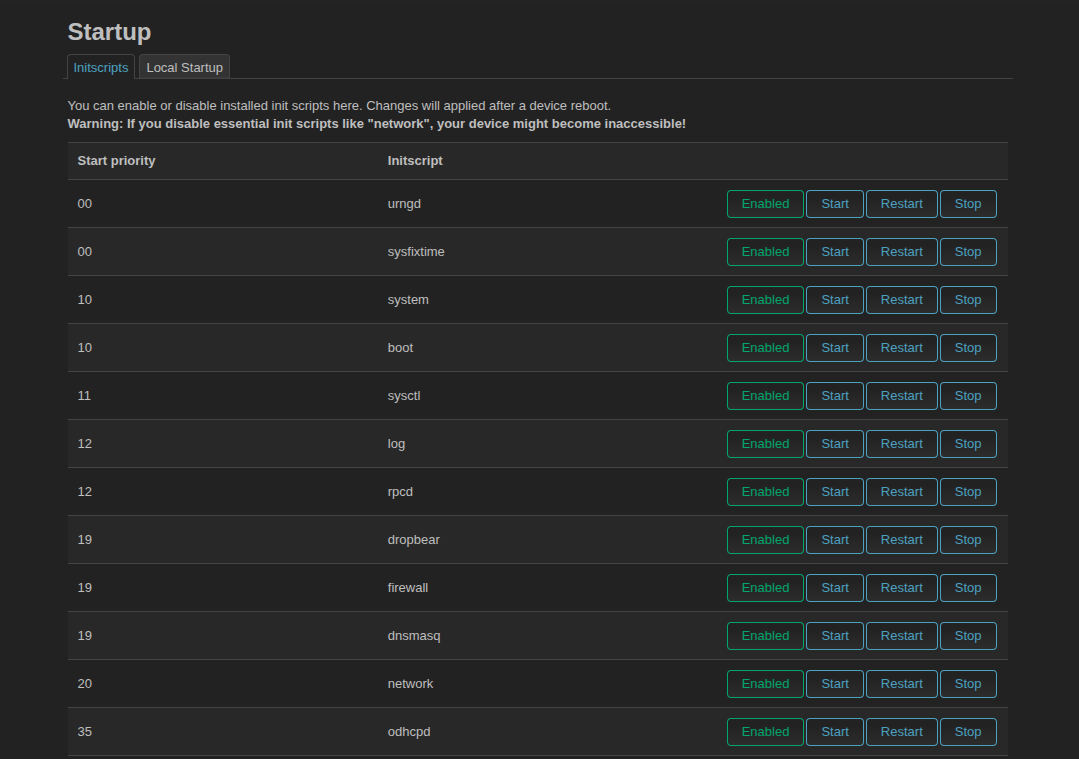
Disabling unnecessary scripts: Almost every network device executes some startup scripts to provide a better user experience to a user. For example, crontab is executed on startup to verify and execute any cron job. Threat actors try to gain persistent access on a network device by adding their malicious scripts on the startup. We can add/remove startup scripts and set the priority through System > Startup.
Important Tools For Network Monitoring
Network monitoring tools are enablers for maintaining the security and performance of networks. These tools use sophisticated algorithms and protocols to capture and analyse real-time network traffic. In addition, they enable network administrators to detect and troubleshoot problems such as bandwidth bottlenecks, network outages, and security threats. Some commonly used tools and their usage is mentioned below:
| Tool | Usage Description |
|---|---|
| Nagios | A popular open-source software for monitoring systems, networks, and infrastructure. It provides real-time monitoring and alerting for various services and applications. |
| SolarWinds NPM | A comprehensive network monitoring tool that provides real-time visibility into network performance and availability. It includes network mapping, automated network discovery, and customizable dashboards. |
| PRTG | An all-in-one network monitoring tool that provides comprehensive performance and availability monitoring. It includes real-time traffic analysis, custom dashboards, and customizable alerts. |
| Zabbix | A powerful open-source network monitoring tool that provides real-time network performance and availability monitoring. It includes features such as customizable dashboards, network mapping, and alerting. |
📚 References
You can find me online at:
