AWS Global Infrastructure — Regions, AZs, and Edge Locations
A practical breakdown of how AWS physically organises its global infrastructure — regions, availability zones, edge locations, and why the design matters for resilience and latency
Why Infrastructure Layout Matters
When you deploy something on AWS, you are making a physical decision — even if it feels like you’re just picking a dropdown. The region you choose determines where your data lives, how fast users can reach it, and what happens when hardware fails. Understanding the global infrastructure model is the foundation for designing systems that are resilient, low-latency, and compliant with data residency laws.
Regions
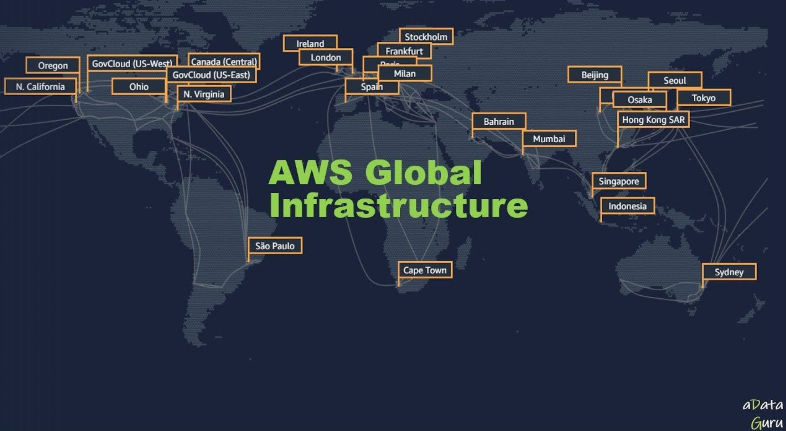
A region is a distinct geographic area that contains multiple, isolated data centres. Each region is completely independent — it has its own power, networking, and cooling infrastructure. A failure in one region has no impact on any other region.
AWS currently operates 30+ regions worldwide, with more being added regularly.
Region naming
1
2
3
4
5
6
7
eu-west-1        → Europe (Ireland)
eu-west-2        → Europe (London)
us-east-1        → US East (N. Virginia)  ← oldest and largest AWS region
us-west-2        → US West (Oregon)
ap-southeast-1   → Asia Pacific (Singapore)
me-south-1       → Middle East (Bahrain)
af-south-1       → Africa (Cape Town)
How to choose a region
You pick a region based on four factors:
| Factor | Consideration |
|---|---|
| Latency | Choose the region closest to your users for lowest response time |
| Compliance | Some laws require data to stay in a specific country (GDPR, Saudi NCA) |
| Service availability | Not every AWS service is available in every region |
| Pricing | The same service costs different amounts in different regions |
Checking region availability
1
2
3
4
aws ec2 describe-regions --output table                    # list all enabled regions
aws ec2 describe-regions --all-regions --output table     # including opt-in regions
aws configure set region eu-west-1                        # set default region
aws ec2 describe-instances --region us-east-1             # target a specific region
Region vs global services
Most AWS services are regional — an EC2 instance, an S3 bucket, a VPC all live in one region. Some services are global and have no region concept:
| Global Service | Notes |
|---|---|
| IAM | Users, roles, and policies are global |
| Route 53 | DNS is global |
| CloudFront | CDN operates globally from edge locations |
| AWS Organizations | Account management is global |
| WAF (with CloudFront) | Applied globally when attached to CloudFront |
Availability Zones (AZs)
An Availability Zone is one or more physical data centres within a region. Each AZ has independent power supply, cooling, and physical security. AZs within a region are connected to each other with high-bandwidth, low-latency private fibre — typically under 1ms round-trip.
A region always has a minimum of 3 AZs. This separation is the core mechanism for building highly available systems on AWS.
AZ naming
1
2
3
eu-west-1a       → first AZ in Ireland
eu-west-1b       → second AZ in Ireland
eu-west-1c       → third AZ in Ireland
Important: the letter suffix (a, b, c) is mapped differently per AWS account. What you see as eu-west-1a in your account may be a physically different data centre from eu-west-1a in another account. AWS does this intentionally to spread load across data centres. The actual physical location is identified by the AZ ID (e.g. euw1-az1), which is consistent across all accounts.
1
aws ec2 describe-availability-zones --region eu-west-1 --output table
Single-AZ vs Multi-AZ
| Design | Behaviour on AZ failure |
|---|---|
| Single-AZ | Entire application goes down |
| Multi-AZ | Traffic fails over to healthy AZ — application stays up |
Multi-AZ is the minimum bar for any production workload. Services like RDS Multi-AZ, ALB, and EKS node groups handle AZ distribution automatically.
How services use AZs
1
2
3
4
5
Application Load Balancer  → spans multiple AZs, routes to healthy targets
EC2 Auto Scaling Group     → distributes instances evenly across AZs
RDS Multi-AZ               → primary in one AZ, synchronous standby in another
EKS node groups            → worker nodes spread across AZs
ElastiCache                → cluster nodes in separate AZs
Local Zones
A Local Zone is an extension of a region placed physically closer to a major city or metropolitan area. It runs a subset of AWS services (EC2, EBS, VPC, RDS) with single-digit millisecond latency to that city. Local Zones are useful for latency-sensitive workloads like live video, gaming, and real-time trading.
Examples:
us-east-1-bos-1→ Boston, extendingus-east-1us-east-1-lax-1→ Los Angeles, extendingus-east-1
Local Zones are opt-in — you enable them per account.
1
2
3
aws ec2 describe-availability-zones \
  --filters "Name=zone-type,Values=local-zone" \
  --region us-east-1 --output table
Wavelength Zones
Wavelength Zones embed AWS compute inside a telecom provider’s 5G network. The goal is ultra-low latency (single-digit milliseconds) for mobile devices connecting over 5G. You deploy EC2 instances and EBS volumes in Wavelength Zones, and traffic from a 5G device goes directly to your application without traversing the public internet.
Use cases: mobile gaming, connected vehicles, AR/VR, real-time IoT.
Edge Locations and the AWS Global Network
Edge locations are AWS data centres deployed in cities around the world specifically to run CloudFront (CDN) and Route 53 (DNS). There are 400+ edge locations across 90+ cities — far more than regions.
Edge locations cache content close to end users. When a user in Cairo requests a file, CloudFront serves it from the nearest edge location rather than from a distant origin region. This reduces latency from hundreds of milliseconds to single digits.
Edge location vs Region vs AZ
1
2
3
4
5
Region          →  full AWS infrastructure, all services available
Availability Zone → one or more data centres within a region
Local Zone      →  subset of services, extended into a metro area
Wavelength Zone →  inside a 5G network
Edge Location   →  CloudFront/Route 53 only, content caching and DNS
Regional Edge Caches
Between the edge location and the origin sits a Regional Edge Cache. These are larger caches that sit in 13 locations globally. Content that is not popular enough to stay in a small edge location stays in the regional cache longer. This reduces the number of cache misses that reach your origin server.
1
User → Edge Location → Regional Edge Cache → Origin (S3 / EC2 / ALB)
AWS Outposts
AWS Outposts brings AWS infrastructure physically into your own on-premises data centre. You get the same AWS APIs, services, and tools running on hardware that AWS ships to you and manages for you. Outposts is for workloads that cannot leave your building due to latency requirements or data sovereignty rules.
Think of it as: a rack of AWS hardware sitting in your data centre, managed by AWS, connected back to a parent region.
The AWS Backbone Network
AWS operates its own global private fibre network connecting all regions, AZs, and edge locations. Traffic between AWS services in the same region (or between regions) travels over this backbone — not the public internet. This is why inter-region data transfer is fast and why services like AWS Global Accelerator can offer significantly better performance than routing over the public internet.
AWS Global Accelerator uses the AWS backbone to route user traffic to the nearest healthy endpoint. It is different from CloudFront — CloudFront caches static content, Global Accelerator routes TCP/UDP traffic (APIs, gaming, VoIP) over the private backbone.
1
2
# List Global Accelerator accelerators
aws globalaccelerator list-accelerators --region us-east-1
Resilience Design Patterns
Active-Active Multi-AZ
All AZs serve live traffic at the same time. If one AZ fails, the load balancer automatically stops sending traffic there. No failover delay — traffic re-routes instantly.
1
2
3
4
                    ALB
                   / | \
               AZ-a AZ-b AZ-c
               EC2  EC2  EC2
Active-Passive Multi-AZ (RDS example)
Primary database in AZ-a, standby in AZ-b. Standby is synchronously replicated but does not serve traffic. On primary failure, AWS promotes the standby — typically in 60–120 seconds.
Multi-Region Active-Active
Deployed in two or more regions simultaneously. Route 53 with latency-based routing or geolocation routing sends users to the nearest region. Requires data replication across regions (DynamoDB Global Tables, Aurora Global Database, S3 Cross-Region Replication). Most complex to operate, but provides the highest level of availability.
Multi-Region Active-Passive (Disaster Recovery)
Primary region handles all traffic. Secondary region sits warm or cold, ready to take over if the primary region fails entirely. Recovery time objective (RTO) depends on how warm the secondary is:
| DR Strategy | RTO | Cost |
|---|---|---|
| Backup and restore | Hours | Lowest |
| Pilot light | Tens of minutes | Low |
| Warm standby | Minutes | Medium |
| Multi-site active-active | Seconds | Highest |
Quick Reference
1
2
3
4
5
6
7
8
9
10
11
12
13
14
15
16
17
18
19
20
21
# List all available regions
aws ec2 describe-regions --output table

# List AZs in a region
aws ec2 describe-availability-zones --region eu-west-1 --output table

# Check AZ IDs (consistent across accounts)
aws ec2 describe-availability-zones \
  --region eu-west-1 \
  --query 'AvailabilityZones[*].[ZoneName,ZoneId]' \
  --output table

# List Local Zones
aws ec2 describe-availability-zones \
  --filters "Name=zone-type,Values=local-zone" \
  --region us-east-1 --output table

# Check which services are available in a region
aws ssm get-parameters-by-path \
  --path /aws/service/global-infrastructure/regions/eu-west-1/services \
  --output text
| Concept | Scale | Purpose |
|---|---|---|
| Region | ~10 cities per continent | Data residency, fault isolation |
| Availability Zone | 3–6 per region | High availability within a region |
| Local Zone | Metro areas | Sub-10ms latency for a city |
| Wavelength Zone | Inside 5G networks | Sub-5ms for mobile devices |
| Edge Location | 400+ worldwide | CloudFront CDN and Route 53 DNS |
| AWS Backbone | Global private fibre | Fast, private inter-region traffic |
You can find me online at:
